


WorkWhile
4.41.61K Reviews
App Specs
- Version
- 2.66.0
- Updated On
- License
- Free
- Downloads
- 500,000+
- Developer
- WorkWhile
- Categories
- Business
- Platform
- Android
Screenshots



 Analysis by AppCompare
Finding short-term work can become a job in itself. I have spent enough time comparing listings, checking locations, and trying to remember which opportunities were still relevant to know that the real challenge is often organization rather than motivation. WorkWhile approaches that problem as a business app for finding jobs in your area, and its value becomes clearer when I use it as one part of a repeatable work-search routine instead of treating it like a magic source of instant employment.
The app is free, aimed at everyone, and developed by WorkWhile. It has reached over 500 thousand installs, with a 4.4 average from around 7 thousand ratings and roughly 1 thousand written reviews. Those figures suggest that it has found a useful place among people looking for flexible or local opportunities, although popularity alone does not tell me whether every listing will suit my schedule or experience.
My overall impression is practical: WorkWhile is most useful when I already know what kind of work, travel distance, and availability I can realistically accept. It is less helpful when I expect the app to make every decision for me. The strongest results come from combining it with a simple personal system for checking opportunities, recording commitments, and following up.
Turning a scattered job search into a workable routine
I find the most useful way to approach WorkWhile is as a focused first stop for nearby work, rather than a complete job-search system. That distinction changes how I use it: I decide what would genuinely fit my week before browsing, then carry promising options into a calendar or notes app so they do not get lost among other possibilities.
What I do before opening the app
Before using WorkWhile, I would write down three boundaries: the days I can work, the time window I can manage, and the maximum journey I am willing to make. This sounds obvious, but it prevents a common mistake with local job apps: saving every attractive-looking opportunity and later discovering that the commute, timing, or workload does not fit real life.
I also separate “available now” from “possibly available.” If I am free on Tuesday morning, that is useful information for immediate searches. If I might be free next month, I treat that as a separate planning note rather than allowing it to shape every decision. This makes the app more useful because I am judging opportunities against a clear personal filter instead of browsing without a stopping point.
For someone between jobs, the workflow can be especially straightforward. I can check the area around home, review suitable openings, note the ones worth pursuing, and then return later with a narrower question: which option still fits my transport, energy, and other commitments? For someone already employed, the same approach helps identify occasional work without turning every spare hour into an obligation.
Worth Reading Before You Choose

EA SPORTS FC Mobile 26 Is a Bigger Football Game, but It Takes Time

Flipboard Shows What News Apps Must Do Beyond the Feed

Switching to Android Auto Means Rethinking Your Driving Routine

Google Calendar Makes a Crowded Week Easier to Manage

Ludo King Makes the Most of the Minutes Between Plans

Baby Panda World Brings Quick Play to Modern Phones, but Its Game Library Feels Busy
Using local results with more discipline
The phrase “in your area” is important, but local does not automatically mean convenient. Two places can look close on a map while being very different by bus, bicycle, or foot. I would always consider the complete journey, including early starts and the return trip, before accepting anything. A nearby opportunity that creates an expensive or unreliable commute may be worse than a slightly farther option with a more manageable schedule.
Another useful habit is to decide in advance what makes a listing worth saving. I look for a clear match with my availability, a location I can reach, and work I am prepared to do. This keeps my saved opportunities meaningful. If I store everything, the app becomes another inbox rather than a tool for making decisions.
Capturing opportunities without losing track
WorkWhile is best treated as the place where I discover and review opportunities, not necessarily as my entire personal planning system. After finding something promising, I record the essential details in a calendar or notes app: the role, location, time, and the next action I need to take. That extra step matters because job searches often fail through forgotten follow-ups rather than a lack of suitable listings.
I would use a simple status system in my notes: “to check,” “ready to pursue,” “committed,” and “not suitable.” It takes very little effort, but it stops me from repeatedly reconsidering the same opportunity. It also makes it easier to see whether I am genuinely building a workable schedule or merely collecting possibilities.
A particularly useful workflow is to check the app at a fixed time, then close it and act on only the best matches. For example, I might review local work after breakfast, select two opportunities that fit my boundaries, and handle any required next steps immediately. This is more sustainable than opening the app whenever I feel uncertain and scrolling until the day disappears.
A realistic everyday scenario
Imagine that I need extra income next week but have a medical appointment on Wednesday and limited transport in the evening. I would first define the available mornings and the distance I can manage. In WorkWhile, I would look for local opportunities that fit those limits, then write down the relevant details rather than trusting myself to remember them from a quick glance.
Next, I would compare the options against the rest of my week. One opportunity might look attractive but require a return journey at a difficult time. Another could be less appealing at first glance but fit neatly between existing commitments. The second is the better choice for a sustainable routine because it reduces the chance that one workday disrupts everything around it.
After deciding, I would mark the commitment in my calendar and keep a short note about what I still need to do. If the opportunity is no longer suitable, I would remove it from my active list instead of leaving it there as false pressure. This is where the app fits into a broader productivity system: it helps me find possibilities, while my calendar and notes help me turn decisions into a reliable plan.
Building a repeatable weekly check-in
I would not recommend checking WorkWhile continuously. A better routine is a short review at the start of the week and another check when my availability changes. During the first review, I can identify realistic openings. During the second, I can respond to cancellations, new commitments, or changes in transport.
The routine should also include a stopping rule. Once I have enough viable work to meet my current goal, I stop browsing and focus on preparation. Without that limit, local job searching can consume the time it is supposed to protect. The app becomes more effective when it supports a decision, not when it encourages endless comparison.
For people who work irregularly, I would keep a reusable weekly template outside the app. It can include available days, travel limits, minimum rest, and any recurring responsibilities. Each time I open WorkWhile, I am then checking opportunities against a stable framework. This is one of the less obvious advantages of using a job-finding app systematically: the quality of the result depends heavily on the quality of the filter I bring to it.
Where the process can become frustrating
No local job app can guarantee that every opportunity will match my preferred hours, distance, skills, or income needs. WorkWhile may help me discover possibilities, but I still have to judge whether they are genuinely practical. Availability can change, and a listing that fits on paper may not fit once I consider transport, preparation time, or other responsibilities.
There is also a mental cost to flexible work. Because short-term opportunities can appear easier to accept than a long-term role, I might say yes too quickly and create an unstable week. I would avoid accepting work simply because it is visible in the app. The right question is whether it supports my wider plan, not merely whether it fills an empty calendar space.
Another friction point is the need to maintain accurate personal records. If I forget what I have already pursued, I may duplicate effort or miss an important follow-up. WorkWhile cannot replace a calendar, reminders, or a basic notes system. That is not a serious flaw in the app’s purpose, but it is an important practical limitation for anyone expecting one download to manage the entire employment process.
What to do when an opportunity stops fitting
My advice is to review commitments as soon as circumstances change. If transport becomes unreliable, another responsibility appears, or the timing no longer works, I would update my personal schedule immediately and reconsider the opportunity. Delaying that decision usually creates more stress than making a clear choice early.
I would also avoid judging the app by one unproductive search. A quiet result may reflect my location, timing, or narrow requirements rather than a permanent problem with the service. At the same time, repeated mismatches are useful evidence. If the available work consistently falls outside my travel range or schedule, a traditional job board, direct employer search, or local staffing service may be a better complement.
How it compares with familiar alternatives
Compared with a general job board, WorkWhile feels more focused on the immediate question of what work may be available near me. A broad board can be better for building a long-term career search, comparing detailed employer information, or tracking formal applications. WorkWhile makes more sense when location and near-term flexibility are central to the decision.
Compared with asking friends or checking community groups, the app offers a more organized starting point. Personal recommendations can provide valuable context, but they are inconsistent and may not appear when I need them. WorkWhile is easier to revisit as part of a routine, while informal sources remain useful for understanding workplace expectations or local reputation.
Compared with visiting staffing agencies in person, the app can be more convenient for initial discovery. An agency may still be preferable when I need human guidance, help interpreting requirements, or support with a more complicated employment situation. I see WorkWhile as a way to widen and structure the search, not as a universal replacement for every local employment resource.
Who should adopt it
I would recommend WorkWhile to people who are comfortable making their own practical judgments and want a focused way to look for nearby work. It may suit someone seeking extra shifts, a person returning to the workforce, or anyone whose availability changes from week to week. It is also a reasonable option for users who prefer to begin with local possibilities rather than search through a large collection of distant or unsuitable roles.
I would be more cautious if I needed a highly specialized professional position, a carefully planned long-term career move, or extensive application management. In those cases, a dedicated professional network, industry-specific board, or recruitment service may provide better context. I would also skip relying on it alone if my transport options are extremely limited or if I need guaranteed hours rather than flexible possibilities.
The app is free and rated for everyone, which makes trying it low-risk from a cost perspective. It runs on Android devices using version 8.0 or later, and the current version is 2.66.0. I would still judge it by whether the opportunities fit my actual life, not simply by how easy it is to install or how many other people use it.
My final assessment
WorkWhile is a useful starting point for a local job search, especially when I approach it with clear boundaries and a repeatable routine. Its main strength is not that it removes every difficulty from finding work; it is that it can make the first stage more focused. I can look for nearby possibilities, compare them with my real availability, and move the best options into a personal plan.
The most important adjustment is to avoid treating the app as a passive feed. I get more from it when I decide what I am looking for before opening it, record worthwhile opportunities afterward, and review my choices against transport, rest, and existing commitments. That workflow turns a quick search into something I can maintain from week to week.
My recommendation is simple: try WorkWhile if local, flexible work is your priority, but pair it with a calendar and a clear decision process. It is a sensible tool for discovering opportunities, not a substitute for evaluating them. Used that way, WorkWhile earns its place in a practical employment routine; used without limits, it can become just another stream of listings to manage.
Pros
- Flexible shifts make it easier to fit work around your existing schedule.
- The app focuses on nearby hourly jobs
- reducing commute time for many users.
- Clear shift details help you review pay
- location
- and requirements before applying.
- Useful for finding short-term work without committing to a permanent position.
- A practical option for workers seeking extra income between regular jobs.
Cons
- Job availability can vary considerably depending on your city and industry.
- Some shifts may require transportation that is not convenient or affordable.
- Competition for attractive
- well-paid shifts can be high.
- Last-minute schedule changes may be difficult for workers with fixed commitments.
- Earnings and opportunities may be inconsistent from week to week.
FAQs for WorkWhile
What is WorkWhile, and how does the app work?
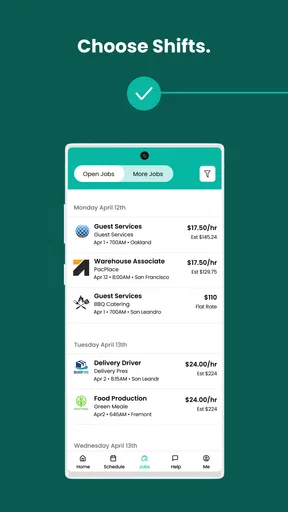
WorkWhile is a flexible staffing and job-matching app designed to connect workers with available shifts from local businesses. After creating a profile, you can review suitable opportunities, check details such as location, schedule, pay, and requirements, and request or accept shifts through the app. Availability and the number of listings can vary depending on your city and qualifications.
Who can use WorkWhile, and what are the basic requirements?
WorkWhile is generally intended for adults looking for hourly, temporary, or flexible work opportunities. Requirements may differ by location and assignment, but users commonly need to provide identity and employment information, complete profile details, and meet any role-specific conditions. Some shifts may require previous experience, transportation, physical capability, certifications, or a background check before participation is approved.
How do payments work on WorkWhile?
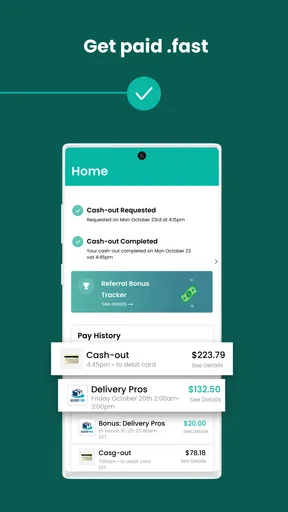
WorkWhile displays the expected pay and shift information before you commit to an assignment, helping you decide whether an opportunity suits your schedule. Payment timing and methods can depend on the job, location, and the platform’s current policies. Before accepting a shift, carefully review the pay rate, deductions if applicable, attendance rules, and payment terms shown in the app.
Is WorkWhile available everywhere, and what types of jobs can I find?
WorkWhile availability depends heavily on your location, since the app relies on participating businesses and local staffing demand. Listings may include warehouse, fulfillment, hospitality, retail, event, or other hourly roles, although the exact categories differ by market. Entering your correct location and keeping your profile updated will help the app show more relevant opportunities when they are available.
What should I know before accepting a shift through WorkWhile?
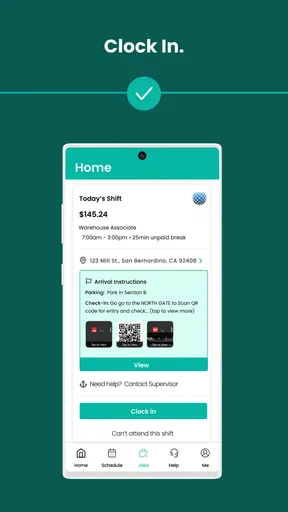
Before accepting a shift, review the start and end times, workplace address, dress code, required equipment, physical demands, cancellation policy, and check-in instructions. Confirm that you can arrive on time and complete the full assignment, because attendance and reliability may affect your account standing. It is also wise to verify transportation arrangements and contact support if any listing details are unclear.


